
In current web development API integration is high propriety. many site has a dynamic data like get list of data to the server and display on clint side so JavaScript needs a clean way to communicate with server using JavaScript Fetch API.
In this blog we will Learn understand of the many topics with example such as What is JavaScript Fetch API?, how to frontend API integration?, HTTP request and response and How communicate with server without using external library such as axios. If you are already familiar with iteration techniques such as the
forEach Loop and traditional looping using For Loop, then learning the Fetch API will feel much more better easy to understand.
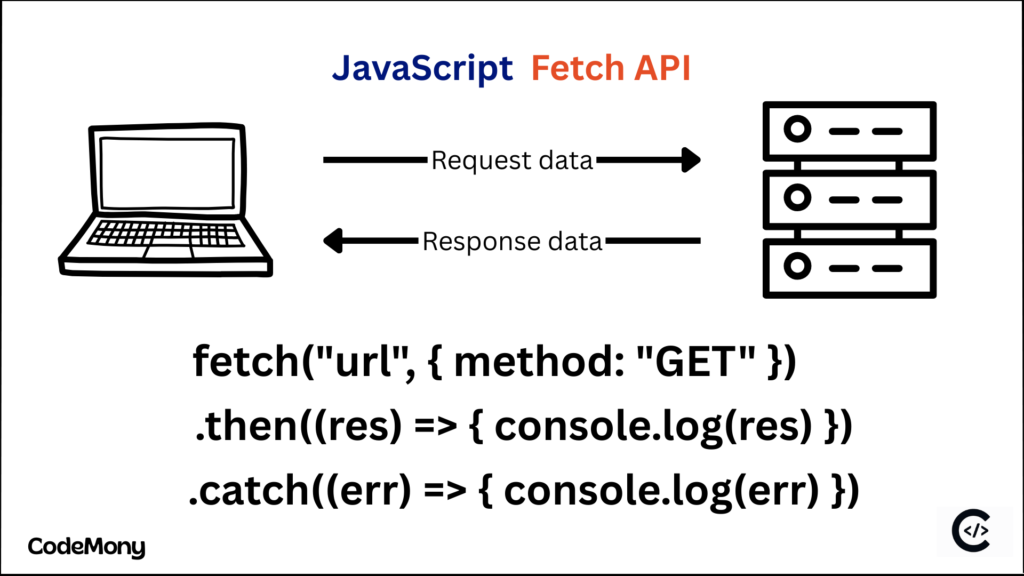
What is JavaScript Fetch API?
JavaScript Fetch API is used to a Transferring data From server to clint side using JavaScript HTTP request. Using Fetch API We can create, retrieve, modify, and remove data using methods like GET, POST, PUT, PATCH, and DELETE.
Fetch method alternate way is axios. but we need to install third party package on over application. That’s why for frontend API integration fetch method is best. Also, We will discuss about the Why Use the Fetch API? in details.
Why Use the JavaScript Fetch API?
In JavaScript Before the fetch method developer use the XMLHttpRequest. so it is complex. There are many reason for the use the fetch API.
Fetch syntax is simple and Cleaner.
It is support async await fetch api.
Response handling Promise-based.
Fetch method support for Native browser and JavaScript HTTP request.
Easy way to handle JSON request response data.
Fetch Syntax
fetch('url', {
  method: 'POST',
  headers: {
    'Content-Type': 'application/json',
  }}) .then(response => response.json())
  .then(data => console.log(data))
  .catch(error => console.error(error));
Fetch methods accept the url, methods, headers and body as a parameter. modern JavaScript prefers async/await fetch api.
url is backend server link address.
Methods is which type of operation such as GET, POST, PUT, PATCH and DELETE.
Headers is used to send the which type of Content to send and receive from the server. Also many time is use for a send to the authentication token to the server.
Body is a request data of an api.
How to Call a REST API in JavaScript Using Fetch API
The Fetch API is ways to communicate with a REST API in JavaScript clint to server, allowing developers to send and receive data. We will see with practical example.
Fetch API with GET Request
JavaScript is allow to the web applications to request and receive data from a server without modify the server. using fetch API GET request. it retrieves information from server using the specific server URL.
Fetch API (GET Request) Example
We want to get today’s weather information from a server.
fetch("https://api.weather.com/weather", {
  method: "GET"
})
  .then(response => response.json())
  .then(weather => {
    console.log("City:", weather.city);
    console.log("Temperature:", weather.temperature + "°C");
  })
  .catch(error => {
    console.log("Unable to fetch weather data:", error);
  });
In this example The browser requests weather data from the server. Using GET method. The server sends back the weather details. Then JavaScript displays the city and temperature. if Error then is is display the error messsage. We can pass the custom headers using fetch api. we will see on next real-word example.
Fetch API with POST Request
Real-World Example: Online Course Enrollment
Imagine a website where users can enroll in online courses. When a user clicks Enroll Now, the JavaScript app sends data to the server and receives a confirmation.
const token = "JWT auth token"
async function enrollCourse() {
  try {
    const response = await fetch("https://codemony.blog/enroll", {
      method: "POST",
      headers: {
        "Content-Type": "application/json",
        "Authorization": `Bearer ${token}`,
      },
      body: JSON.stringify({
        userId: 102,
        courseId: "JS_ADV_01",
        paymentStatus: "completed"
      })
    });

    if (!response.ok) {
      throw new Error("Enrollment failed");
    }

    const result = await response.json();
    console.log("Enrollment Successful:", result.message);

  } catch (error) {
    console.error("Error:", error.message);
  }
}

enrollCourse();
This example is showing the how to send data to the server using fetch api with passing the authorization herders. and API response. API responses include strings such as usernames, messages, or formatted text. To manipulate these values, you should also explore JavaScript Substring() which pairs perfectly with Fetch API data handling in real-world applications.
GET, POST, PATCH and Delete methods are the REST API JavaScript.
JavaScript Fetch API Error Handling Best Practices
Error handling is the most important pass because many time fail the api due to validation or database problems. You must check the response.ok. and status.
if (!response.ok) {
  throw new Error("Server side Error");
}
response.ok is give you to full controls of Your JavaScript fetch API calling. If is success or frailer.
When Should You Use Fetch?
If You want to support a native browser.
You don’t want external library dependencies like axios.
You need clean and readable code.
You’re building modern JavaScript apps.
fetch vs axios
Difference Between Fetch and Axios in JavaScript. Both are communicate with server with different purpose.
| Fetch | Axios |
| Fetch is depends on browser. | Axios creates a consistent API layer so it is not depends on browser. |
| Fetch is Built directly on browser. | Third-party library. |
| No installation required | Installation required |
| It is not automatically convert response to JSON. Developer must use res.json() methods. | It is Automatically converts response to JSON. |
| Requires manual error checking | Cleaner error handling |
| No built-in interceptors | Support built-in interceptors. |
| Manually transforms request and response data. | Automatically transforms request and response data |
| No Built-in request cancellation | Built-in request cancellation |
| Fetch is not suitable for media-heavy applications. | Axios is more suitable for media-heavy applications. |
Can Fetch API be used without a backend?
Yes. You can use the Fetch API with public APIs or mock APIs
Can Fetch API handle JSON and text responses?
Yes, You can handle both test and JSON response.
Can Fetch API be used inside React applications?
Yes. Fetch API is commonly used in React inside useEffect.